Apples Set: Versatile Craft Designs for Back to School
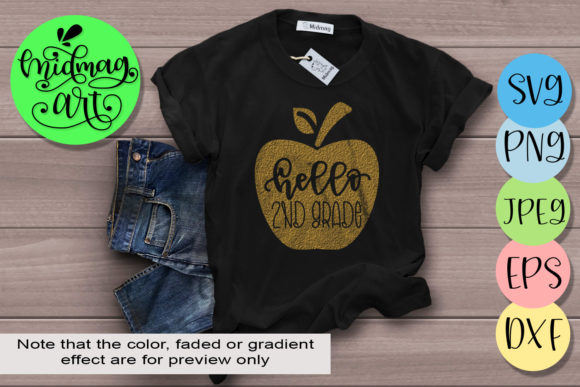
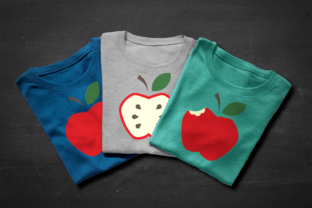
If you have a desktop plotting machine like a Cricut Explore or Silhouette, or if you enjoy working with vinyl, paper, or iron-on transfers, a well-designed template set can save hours of work. The Apples Set offers three distinct apple designs: a whole apple, an apple with a bite taken out, and an apple sliced in half with seeds showing. This set is an instant download, ready for cutting machines, hand cutting, or even iron-on decals using photo transfer paper. Whether you are preparing classroom materials, creating products for a small business, or just looking for a quick weekend project, these apple designs can fit into many different workflows and skill levels.
What the Apples Set Includes and Why It Matters
At its core, this set provides three vector-style apple motifs that you can use immediately after download. The whole apple works well for simple decorations or labels. The bitten apple adds a playful twist, ideal for projects aimed at children or for themes around healthy eating. The sliced half-apple, complete with visible seeds, offers a more detailed option for educational diagrams or layered designs. Because the files are designed for plotting machines, they come with clean cut lines and optimized paths. That said, you are not limited to machine cutting. With a printer and photo transfer paper, you can create iron-on decals without owning a cutting machine. For paper crafters, some of the shapes are simple enough to cut by hand with scissors or a craft knife.
This flexibility matters because not everyone works the same way. A beginner might appreciate the ready-to-cut SVG or DXF files that eliminate the need to draw from scratch. An experienced user might value the ability to scale, rotate, or combine these apples with other elements in a design software. A teacher might care most about the clarity of the seed detail for a science lesson. A small business owner might weigh how quickly they can produce multiple decals or stickers for a seasonal sale. The set’s value shifts depending on who you are and what you need it for.
For Educators and Parents: Quick, Clear, and Kid-Friendly
Back-to-school season is a natural time for apple-themed crafts, decorations, and learning materials. Teachers often look for resources that are both visually engaging and easy to prepare. The Apples Set fits here because the designs are straightforward and recognizable. You can use the whole apple for name tags, the bitten apple for a snack-themed bulletin board, and the sliced apple to teach parts of a fruit in a science unit. Because the set is an instant download, there is no waiting for shipping. You can print and cut the same afternoon.
For parents helping with homework projects or classroom donations, the set removes the guesswork. Instead of searching for clip art and adjusting proportions, you have a ready-made shape that cuts cleanly. If you own a cutting machine, you can produce multiple copies quickly. If you do not, you can still print the design onto iron-on transfer paper and apply it to a tote bag or t-shirt for a teacher gift. The educational angle matters here: the sliced apple with seeds is especially useful for lessons about plant growth or healthy eating. The design is accurate enough to be informative but simple enough for young children to understand.
Speed and reliability become important in a classroom setting. You may need ten name tags or thirty apple cutouts for a craft station. The Apples Set allows you to scale production without redrawing the shape each time. For a parent volunteering at a school event, being able to cut a stack of apples quickly with a machine or even by hand using printed templates can make the difference between a stressful preparation and a smooth one.
For Beginners: Low Pressure, High Reward
If you are new to using a cutting machine or working with vinyl, starting with simple shapes builds confidence. The whole apple and the bitten apple are uncomplicated outlines that do not require precise layering or advanced software knowledge. You can load the file into your design space, resize it to fit your project, and cut it in one pass. There is no complex assembly or multiple layers to align unless you choose to add them. That makes the Apples Set a good entry point for learning how to weed vinyl, apply transfer tape, or set up a print-and-cut file.
For someone who has never tried iron-on decals without a cutting machine, the photo transfer method offers a low-cost experiment. You print the design onto transfer paper, cut around it by hand, and press it onto fabric. This approach lets you test the design before investing in a machine. If you later decide to buy a Cricut or Silhouette, the same files will work with your new equipment. The set grows with you.
Cost is another factor for beginners. A single set of three designs at a reasonable price is less intimidating than a large bundle. You can focus on one project type, such as decorating a notebook or making a few stickers, without feeling overwhelmed. The instant download format also means you avoid shipping fees and can start immediately, which is helpful when you are eager to try a new hobby.
For Experienced Crafters and Creators: Flexibility and Customization
Experienced users often look for designs that can be adapted, combined, or used as a base for more complex projects. The Apples Set provides clean vector shapes that you can modify in your preferred software. You can change the size, rotate the angle, or add internal lines for additional detail. The bitten apple, for example, could be combined with a worm shape or a leaf from another set. The sliced half-apple could be used in a pattern or repeated to create a seamless background.
Quality of the cut lines is a priority for professionals. If the paths have redundant nodes or uneven curves, the machine may cut poorly or the vinyl may tear during weeding. Well-optimized SVG or DXF files save time and reduce material waste. The Apples Set is designed with clean geometry, which means less cleanup in your design software and more reliable cuts. This reliability matters when you are producing items for sale or for a client project where consistency is key.
For creators who sell finished products, the commercial use rights should be checked. Assuming the set allows commercial use, you could produce apple-themed stickers, decals, or iron-on transfers for a farmers market or an Etsy shop. The three variations give you product variety without needing multiple design sources. You could offer a set of three apple decals, or use the whole apple for a simple product and the sliced apple for a more detailed premium option. The time saved by not having to draw each variation from scratch adds to your profit margin.
For Small Business Owners: Efficiency and Product Range
Small business owners, whether they sell at craft fairs, online, or through local shops, need designs that work across different product types. The Apples Set can be used for vinyl decals, iron-on apparel, paper goods like cards and gift tags, or even stencils for painting. Because the set includes three distinct designs, you can create a small product line around a single theme. That coherence appeals to customers who like matching sets.
Speed of production directly affects revenue. With a cutting machine and optimized files, you can cut multiple apples in minutes. If you use print-and-cut for stickers, the clean outlines make contour cutting easier. For iron-on projects, you can size the design to fit different garments without distorting the shape. The instant download means you can start producing as soon as you purchase, without waiting for physical media to arrive.
Reliability becomes crucial when you are fulfilling orders. A file that cuts correctly every time reduces the risk of ruining materials. The Apples Set’s simple geometry minimizes the chance of cutting errors. If you sell at a market and need to restock quickly, being able to cut a fresh batch of decals on demand is a practical advantage. The set’s versatility also lets you test new products without a large upfront investment. You could create a small run of apple-themed notebooks and see how they sell before scaling up.
For Hobbyists and Paper Crafters: Hand Cutting and Mixed Media
Not everyone owns a cutting machine, and many crafters enjoy the tactile process of cutting by hand. The Apples Set includes designs that are suitable for hand cutting, especially the whole apple and the bitten apple. The shapes have clear outlines without excessive tiny details that would be frustrating to cut with scissors or a craft knife. You can print the design onto cardstock, cut it out, and use it for scrapbooking, card making, or collage.
The sliced half-apple requires more precision, but it can still be cut by hand if you use a sharp blade and take your time. You might choose to cut only the outer shape and use the seed detail as a reference for drawing or painting. For mixed media projects, you could layer the three apples in different materials: one in patterned paper, one in foil, and one in fabric. Because the designs are simple, they work well as stencils for paint or ink.
Long-term usefulness matters to hobbyists who build a library of design files. The Apples Set is not tied to a specific season or trend. Apples are a classic motif that appears in fall decor, back-to-school crafts, kitchen decor, and even wedding themes. You can reuse the designs year after year for different projects. That makes the set a practical addition to your collection rather than a one-time use purchase.
How to Decide If the Apples Set Matches Your Needs
Before purchasing any design set, it helps to consider your skill level, your equipment, and your project goals. The Apples Set is well suited for someone who wants a simple, recognizable shape with multiple variations. If you need a highly realistic apple with shading and gradients, this set may be too minimal. But if you want clean, scalable outlines that cut reliably and can be customized, it is a strong choice.
For beginners, the set removes the barrier of drawing your own shapes. You can focus on learning your machine or practicing weeding without worrying about design quality. For experienced users, the set provides a solid foundation for more complex compositions. For educators and parents, the designs are clear and kid-friendly. For business owners, the set offers production efficiency and product variety. For hobbyists, the hand-cutting option makes the set accessible even without a machine.
Consider your typical project size. If you make large wall decals, the whole apple scales up smoothly. If you make small stickers, the bitten apple works at a tiny size without losing readability. The sliced apple with seeds is the most detailed and works best at a medium to large size to preserve the seed visibility. Test the file with a small cut first to ensure it meets your expectations.
Think about material compatibility as well. Vinyl, iron-on, cardstock, and printable transfer paper each behave differently. The design files are optimized for standard cutting machine settings, but you may need to adjust blade depth or pressure depending on your material. If you plan to use the photo transfer method for iron-on, ensure your printer can handle transfer paper and that you have a heat press or household iron with even heat distribution.
Final Thoughts on Practical Value
The Apples Set is a focused collection that does one thing well: it gives you three apple designs that are ready to cut, print, or trace. Its value comes from the time it saves you in drawing and troubleshooting, and from the flexibility it offers across different crafting methods. Whether you are preparing for back to school, launching a small product line, or simply enjoying a creative afternoon, the set provides a reliable starting point. The instant download format and compatibility with multiple machines and hand-cutting approaches mean you can adapt it to your own workflow. By matching the designs to your specific project and skill level, you can make the most of what this set offers without unnecessary complexity or waste.