Back to School Kids Tshirt MockUp Bundle: A Practical Comparison for Designers and Sellers
When you are preparing a new line of back-to-school apparel, the mockups you use can make a significant difference in how your designs are perceived. The Back to School Kids Tshirt MockUp Bundle is a specific resource designed for this season, offering ten color variations in a straightforward format. But how does it stack up against other mockup solutions? In this article, we break down what this bundle offers, explore its strengths and tradeoffs, and help you decide if it fits your workflow.
Understanding the Back to School Kids Tshirt MockUp Bundle
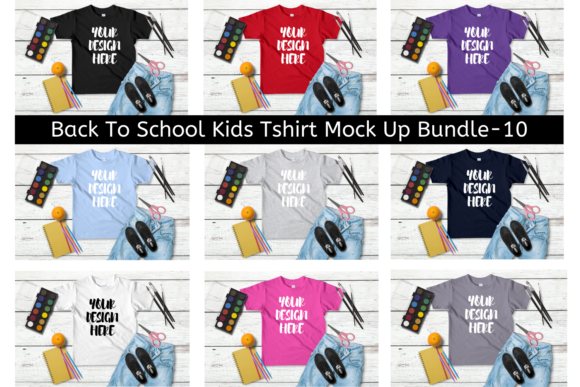
This bundle provides ten separate mockup files, each featuring a different shirt color. The format is simple: you download a zip file and then place your own PNG design onto the shirt using software like Photoshop or Gimp. The main image shows all ten color variations, giving you a clear preview of what you will receive. The distinct advantage here is the focus on a specific niche—children’s t-shirts for the back-to-school period. The bundle does not include additional props, backgrounds, or poses; it is a clean, straightforward mockup that puts the attention on your artwork and the shirt color.
For someone who wants to quickly generate product images for an online shop, this bundle reduces the number of steps. You do not need to adjust lighting, shadows, or perspective because each mockup is pre-rendered. You only need to drop in your design, and it automatically aligns with the shirt’s shape. This can save hours compared to starting from scratch with a 3D rendering tool or a complex layered PSD file.
Comparing the Bundle with Alternative Mockup Approaches
Mockup resources vary widely. Some come as fully layered Photoshop files (PSD) that let you change background colors, adjust shadows, or even replace the model. Others are 3D scene files that you render yourself, offering unlimited control but requiring technical skill and rendering time. There are also online mockup generators that produce images through a web interface, often limiting you to preset designs.
The Back to School Kids Tshirt MockUp Bundle occupies a middle ground. It is more flexible than a web generator, because you can use any PNG design you create, but it is less customizable than a layered PSD that lets you tweak every seam. The key distinction is that this bundle gives you ten predetermined shirt colors with a consistent lighting and pose. If you need a diverse range of colors for a single design, this bundle provides that variety without the need to buy or create multiple mockups separately. However, if you require a specific color not included—say neon green or a pastel lavender—you would need to find another mockup or edit the color yourself, which might not be straightforward with the provided files.
Strengths of a Pre-Rendered Color Set
One practical advantage is speed. Imagine you have designed a simple “Welcome to Kindergarten” graphic. With this bundle, you can show it on a white, black, blue, red, pink, gray, orange, yellow, green, and purple shirt in minutes. That variety is useful for customers who want to see options before buying. For an Etsy or Amazon seller, presenting multiple color choices often leads to higher conversion rates because shoppers can visualize the product on their preferred color.
Another strength is consistency. All ten mockups share the same lighting, angle, and background. This creates a cohesive look across your product listings. In contrast, if you assembled mockups from different sources, you might have one image with a bright studio light and another with outdoor shadows, which can confuse buyers. The bundle’s uniformity helps maintain a professional storefront.
Tradeoffs and Limitations to Consider
The most obvious tradeoff is the lack of scene customization. The background in each mockup is fixed—usually a plain or lightly textured backdrop. If your brand aesthetic demands lifestyle shots (e.g., a child wearing the shirt in a classroom or park), you would need to use a different mockup type. Similarly, because the model is not shown (only the shirt on a hanger or flat lay), you cannot convey size or fit on a real child. This may be sufficient for simple listings, but some buyers appreciate seeing how the fabric drapes on a body.
Another limitation is the file format. The bundle description says you can use “any graphic designing software” that supports PNG layers, but you still need to know how to open the mockup file and place your design correctly. For absolute beginners, even this straightforward process might require a tutorial. Additionally, the zip file contains ten separate images; unless you organize them carefully, you could accidentally mix up colors in your listings.
Color accuracy is another factor. The mockup colors shown in the main image are approximations on screen. When you overlay your PNG design, the final result will depend on the blending mode you use (often “multiply” or “screen”). The bundle likely expects a specific overlay method, but if you are new to this, you may need to experiment to achieve a natural look. Some layered PSD mockups handle this automatically with smart objects, which is more forgiving for beginners.
When the Bundle Is the Right Choice
If you are a small business owner, a print-on-demand seller, or a freelance designer creating a limited number of back-to-school designs, this bundle offers a cost-effective way to produce multiple mockup images quickly. The ten colors cover the most popular shirt options for children, and the uniform style reduces the risk of mismatched product photos. It is especially helpful when you need to batch-create listings for a single design in various colors.
Example: You have a “First Day of School” graphic that you want to sell on white, blue, and gray tees. With this bundle, you produce three uniform images in less than ten minutes. You can then reuse those mockups for other designs by replacing the artwork—saving time on repetitive setup.
When You Might Need a Different Approach
If you are planning a large catalog with dozens of designs and need to show each one in multiple colors, the manual process of overlaying a PNG onto ten separate files might become tedious. In that case, a layered PSD mockup with a smart object could be more efficient because you can update the design once and it applies to all color variations within the same file. Similarly, if your target audience expects to see the shirt on a child, a mockup that includes a model will be more persuasive.
For a design that requires exact color matching—such as when the shirt itself is a specific brand or when your artwork needs to be precisely color-calibrated—the pre-set colors in the bundle may not be precise enough. You might need to create your own mockup from a blank template to control every variable.
Another scenario: if you are a professional packaging designer who needs to present concepts to a client, the fixed background and lighting might feel too generic. You may want a mockup that allows you to put the shirt in a branded environment or adjust the scene’s mood. In such cases, investing in a more customizable resource could be worth the extra time and cost.
Decision Factors: What to Evaluate Before Choosing
As you compare mockup options, consider these factors:
- Time vs. customization: The more customizable a mockup, the more time you invest in setup. The Back to School Kids Tshirt MockUp Bundle leans toward speed with limited customization.
- Number of colors needed: If ten colors satisfy your range, this bundle is efficient. If you need more, look for a bundle with a wider palette or a template that lets you change the shirt color easily.
- Ease of use: For someone comfortable with layers and blending modes, the PNG overlay method is straightforward. Beginners might prefer mockups that use smart objects, which require only dragging and dropping a design.
- Presentation style: Decide whether flat lays, hanger shots, or model shots are essential for your buyers. This bundle uses a shirt-only view, which is neutral but may not convey lifestyle context.
- Reusability: If you plan to use the same mockup for many designs, test how quick it is to replace the artwork. With this bundle, you would open each file and place your PNG—a repetitive step if you have many colors.
Conclusion
Choosing a mockup resource is about matching your production needs with the tool’s strengths. The Back to School Kids Tshirt MockUp Bundle serves a clear purpose: providing ten consistent, easy-to-use shirt mockups for back-to-school merchandise. It is not a one-size-fits-all solution; its tradeoffs in customization and scene variety mean it is best for sellers who need volume and uniformity rather than unique presentations.
By understanding what this bundle offers relative to other formats, you can make a decision that balances efficiency, cost, and presentation quality. Whether you use it for your entire lineup or only as a starting point, knowing its place in the toolkit helps you produce better product images without unnecessary effort.