Hello Pre-k: More Than a Fun Phrase—A Design Essential for Back-to-School Projects
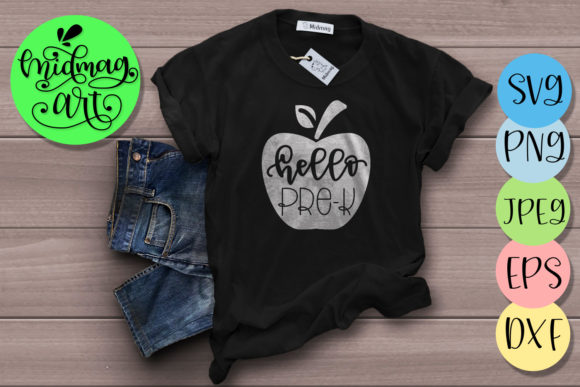
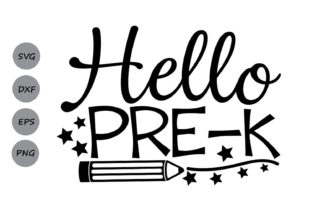
If you’ve spent any time scrolling through crafting communities or planning a little one’s first school milestone, you’ve likely come across the phrase “Hello Pre-k.” It’s one of those simple, happy greetings that signals a big moment: the start of formal learning. But for many creators, parents, and small business owners, that phrase is also the centerpiece of dozens of projects. Whether you’re making a shirt for the first day, decorating a classroom, or selling custom gifts, the Hello Pre-k SVG pack (which includes SVG, DXF, PNG, and EPS files) gives you the flexibility to create just about anything.
Let’s walk through where, when, and why people actually use these files—and what you should think about before you start cutting or printing.
What This File Pack Actually Includes
Before we jump into project ideas, it helps to know exactly what you’re getting. The Hello Pre-k SVG bundle typically comes as a zip file containing four file formats:
- SVG file – Works with Cricut Design Space, Silhouette Studio, Brother ScanNCut, and most cutting machines.
- DXF file – Ready for Silhouette Studio software, often used for precise cutting.
- PNG file – A raster image that can be used in standard software with trace functionality, or for quick digital previews.
- EPS file (Version 10) – Ideal for designers working in Adobe Illustrator or other vector-based programs.
All files come in black by default, which makes them easy to recolor, layer, or resize without losing quality. That black base means you can treat the design like a stencil or a cut line—perfect for vinyl, heat transfer, or screen printing.
Who Reaches for Hello Pre-k Designs?
Honestly, you might be surprised by the range of people who download these files. It’s not just one type of user. Here are a few real-world scenarios:
Parents Planning the First Day of School
For many parents, the first day of pre-k is emotional. They want a photo that captures the moment, and a custom shirt or sign with “Hello Pre-k” makes that picture even sweeter. Instead of buying a generic shirt at a big-box store, they grab the SVG, load it into Cricut Design Space, and cut iron-on vinyl for a shirt that actually fits and feels personal. Some even make matching sibling shirts or a sign for the front door. The back to school SVG community is huge for a reason—parents love the ability to customize.
Classroom Teachers and Educators
Teachers are often the unsung heroes of the SVG world. They use Hello Preschool SVG files to decorate bulletin boards, label cubbies, create welcome banners, and make name tags. Because the pack includes DXF and EPS formats, even teachers who use older Silhouette machines or school computers with specific software can still open the file. That kind of compatibility matters when you’re prepping a classroom on a tight timeline.
Small Business Owners and Hobbyist Crafters
If you run a small shop on Etsy, Facebook Marketplace, or at local craft fairs, back-to-school season is prime time. First day of school designs sell fast, especially if they’re unique. A shop owner might buy the Hello Pre-k SVG pack, resize it for onesies, toddler tees, and toddler tumblers, then list them as ready-to-ship items. Because the vector files scale cleanly, one purchase can turn into multiple product lines. Some crafters also offer personalization—adding a child’s name in a matching font—which bumps up perceived value.
Bloggers and Content Creators
Bloggers who write about parenting, early childhood education, or DIY projects need visuals that stand out. A clean SVG design like “Hello Pre-k” can become the header for a blog post about school readiness, a free printable for subscribers, or part of a social media graphic. Because the PNG file is included, they can drop it straight into Canva or Photoshop without extra steps.
Where You’ll Actually Use These Files
Let’s get specific about the types of projects people build around this design. It’s not just about the phrase itself—it’s about how the file format unlocks different possibilities.
Apparel and Accessories
This is probably the most common use. Iron-on vinyl cut from the SVG file works on cotton tees, hoodies, tote bags, and even denim jackets. Some crafters layer the text over a small school bus or apple graphic (sold separately or created with offset tools). For baby and toddler sizes, the “Hello Pre-k” phrase fits nicely across the chest or back. A lot of parents also make matching bows, headbands, and backpack charms using the same design.
Home and Classroom Decor
The school SVG file works just as well on wood, canvas, or acrylic. People use it to:
- Create framed signs for a playroom or classroom entrance.
- Make vinyl decals for water bottles, lunch boxes, and nap mats.
- Design customized growth charts with “Hello Pre-k” at the bottom.
- Cut cardstock for scrapbook pages or memory books.
Because the file is a vector, you can scale it up to 12 inches or more without pixelation—crucial for larger wall decals.
Party and Event Supplies
Some families throw a small back-to-school party or a “Pre-k Graduation” celebration. The SVG becomes the theme: cupcake toppers, gift tags, banners, and even treat bag labels. If you’re making party favors for a class of 12 kids, the DXF and EPS formats let you batch-cut on a Silhouette or Cricut without reloading files.
Digital Products and Printables
Not every project involves cutting. Many creators use the PNG file to design digital invitations, virtual classroom announcements, or social media posts. Because the PNG has a transparent background (if exported properly), it layers easily over photos or patterned backgrounds. A daycare provider might use the Hello Preschool SVG to make a welcome PDF for new families.
What to Consider Before You Download or Buy
The “Hello Pre-k” file pack sounds straightforward, but a few details can save you headaches. Here’s what experienced users keep in mind:
Machine Compatibility
Not every cutting machine reads every format. If you use a Cricut, the SVG file is your safest bet. Silhouette users often prefer DXF, but newer software versions handle SVG just fine. The EPS file is great for designers, but some hobbyist machines won’t import it directly. Always check which format your specific machine and software version supports. The bundle covers all major options, so you’re probably fine—but it’s worth double-checking if you use an older program.
Color and Layering
The files come in black. That’s standard for cut files because you can assign colors in your software before cutting. If you want a multi-color design (like rainbow letters or a colored background shape), you’ll need to ungroup the SVG and change each letter’s fill. That’s easy in Design Space or Studio, but if you’re new to vector editing, it’s worth watching a quick tutorial. Some sellers also offer a color version, but most experienced crafters prefer the black base for flexibility.
Licensing and Commercial Use
If you plan to sell finished products (shirts, decals, party kits), check the license. Many SVG packs allow commercial use for small-scale production, but some restrict the number of sales or require attribution. Since the bundle is sold by various shops, read the terms carefully. For most hobbyists and micro-businesses, the standard license covers selling physical items. Mass production or digital resale usually requires a different license.
Font and Design Style
“Hello Pre-k” comes in a specific font—often playful, slightly rounded, and friendly. That works great for preschool. But if your brand or project leans more modern or minimalist, consider whether the style fits. Some creators pair the phrase with a simple school bus or pencil graphic to balance the design. You can also use your software to add outlines, shadows, or offset layers to make the text pop.
Practical Tips for Getting the Best Results
Over the last few years, I’ve seen people use these files in smart ways and frustrating ways. Here’s what separates a smooth project from a struggle:
- Test cut first. Always cut a small sample on scrap material before the real project. This catches sizing issues and material compatibility problems early.
- Mirror your image. If you’re using iron-on vinyl, remember to mirror the design in your software before cutting. Forgetting that step is the most common mistake.
- Weed carefully. The letters in “Hello Pre-k” have small closed areas (like the “o” and “e”). Use a fine weeding tool and take your time to avoid lifting thin sections.
- Save your presets. Once you find the right cut settings for a specific material (like Cricut premium vinyl or Siser HTV), save them. That way, next year’s pre-k projects go faster.
Why This Design Endures
“Hello Pre-k” isn’t just a seasonal trend. It’s one of those milestone phrases that families and educators come back to year after year. The design works for the first day, for promotional materials, and for keepsakes. Because the file comes in multiple formats, it fits into nearly any creative workflow—whether you’re cutting vinyl at home or designing a digital flyer on your laptop.
If you’re planning projects for the upcoming school year, having a reliable back to school SVG like this one in your collection can save you design time and give you a consistent look across shirts, decor, and gifts. The key is knowing what you want to make, choosing the right format for your machine, and giving yourself a little room to experiment with color and layout.
Whether you’re a parent stitching a memory, a teacher setting up a welcoming classroom, or a creator building a seasonal product line, the First day of school moment matters. And having the right file—ready to cut, print, or trace—makes that moment a little easier to share.