School Supply Digital Designs for Smart Budget-Friendly Crafting
If you create custom apparel, classroom decor, or handmade gifts for teachers and students, you know how quickly the cost of materials adds up. Between vinyl, transfer paper, and the designs themselves, back-to-school projects can strain a budget before you even start cutting. That is why buying a complete School Supply design set in one affordable download makes practical sense. Instead of purchasing each graphic separately, you get four coordinated illustrations plus single-color versions, all ready for your cutting machine, printer, or even hand cutting.
What This Design Set Includes
The set features four back-to-school themed illustrations built with a playful, friendly look. Each design has a distinct personality that works well on its own or combined with others in a single project. Here is what you will find inside the zip folder after download:
- Pencil with glasses and the phrase “smarty pants” — shown in a separate listing image, this design pairs a classic school supply with a fun, encouraging message. The glasses give the pencil a clever, studious character that resonates with students and teachers alike.
- Glue bottle with a face — a smiling glue bottle that adds a whimsical touch. This design works especially well for art supply labels, craft room decor, or shirts for creative kids and educators.
- Crayon box — a classic crayon container that reads as instantly recognizable. It is ideal for larger projects like tote bags or wall decals where you want a broad, colorful silhouette.
- Crayon with a face — a single crayon given a cute expression. This pairs nicely with the crayon box or stands alone for smaller spaces like water bottles, notebooks, or pencil pouches.
Every design also comes in a single color version. That is important because it gives you flexibility for layered vinyl projects, screen printing, or situations where you need a simpler, more iconic look without extra details.
Why a Set Saves You More Than Just Money
Buying individual designs from different shops can lead to inconsistent art styles, mismatched scales, and extra file management. With this School Supply bundle, all four graphics share a cohesive aesthetic, so you can mix and match them without worrying about whether they will look like they belong together. That coherence is especially valuable if you are creating a coordinated set of items — for example, a teacher gift bag with a pencil shirt, a crayon tote, and a glue bottle mug.
The single color versions further stretch your options. You can use the full-color illustrations for iron-on transfers and paper crafts, then switch to the simplified versions for vinyl decals or embroidery digitizing bases. One download effectively gives you eight distinct design options.
With a Cutting Machine (Cricut or Silhouette)
After downloading the zip folder, extract the files and import them into your design software. The set works with both Cricut Explore and Silhouette machines. You can weed and apply vinyl to almost any hard or fabric surface. Consider these real-world applications:
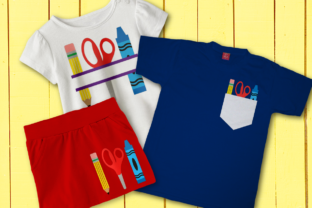
- Classroom labels — cut the crayon box design in bright vinyl and apply it to storage bins, cubbies, or supply drawers. The friendly characters help younger students identify where materials belong.
- Teacher appreciation gifts — layer the “smarty pants” pencil onto a stainless steel tumbler or canvas tote. Add the students’ names with a separate font cut for a personalized touch.
- School event shirts — combine the glue bottle and crayon with a face on a crewneck or tee for a field day or back-to-school night. The single color versions simplify the layering process.
Without a Cutting Machine (Iron-On Transfers)
Not everyone owns a plotter, and that is fine. With a standard inkjet or laser printer and photo transfer paper, you can print the designs directly and press them onto fabric using a household iron. This method works well for small batch projects or when you want full-color images without weeding. The single color versions also print cleanly for a more graphic look.
Hand Cutting for Paper Crafters
Some of these designs have relatively simple outlines that can be cut by hand with a craft knife or scissors. The crayon with a face and the glue bottle are especially good candidates for paper crafting. You could use them for:
- Scrapbook pages documenting the first day of school
- Greeting cards for teachers or bus drivers
- Bulletin board decorations in a homeschool or classroom setting
For the more detailed pencil and crayon box, a cutting machine or printer transfer is recommended, but the set still accommodates hand cutters on the simpler shapes.
Practical Considerations Before You Download
Before purchasing any School Supply design set, take a moment to think about your specific workflow and end use.
File format compatibility — confirm that the extracted files include SVG, DXF, or PNG formats your software accepts. Most cutting machine programs work with SVG, but double check if you use an older version of Silhouette Studio or a less common platform.
Size scaling — the designs come at a default size, but you can scale them up or down in your software. Be mindful of small details like the glasses on the pencil or the face on the glue bottle. If you shrink the graphic too much, those fine elements may become difficult to weed or may lose definition on fabric.
Vinyl type matters — for items that will be washed frequently, such as shirts or lunch bags, use permanent adhesive vinyl or heat transfer vinyl designed for fabric. For indoor decor like wall decals or notebook covers, removable vinyl works fine and is easier to reposition.
Color planning — the full-color versions are ready to print, but if you are cutting layered vinyl, you will need to separate the colors into individual layers. The single color versions simplify this task because they function as one-layer cuts. Plan your material colors ahead to avoid mid-project trips to the craft store.
Who Benefits Most from This Set
Teachers and educators can use the designs to personalize their classrooms without spending a lot. A quick iron-on transfer to a plain apron or a vinyl cut on a storage bin adds personality that store-bought decor cannot match. Parents preparing back-to-school supplies for their own children also find value here — customizing a water bottle or backpack helps kids identify their belongings and reduces lost items.
Small business owners and entrepreneurs who sell handmade goods on platforms like Etsy or at local markets will appreciate the turnaround speed. Because the designs are an instant download, you can start crafting within minutes of purchase. The mix of full-color and single color versions also lets you offer both premium layered items and simpler, lower-cost options to your customers.
Hobbyists and paper crafters who enjoy scrapbooking, card making, or bullet journaling can incorporate these graphics into their projects. The single color versions work especially well for stamping or tracing if you prefer analog methods over digital cutting.
A Note on Quality and Attribution
When you purchase a design set like this, you are paying for the artist's time and skill. The illustrations have been cleaned, tested, and prepared for practical use. That reliability matters when you are producing items for sale or for a group event. You can trust that the cut lines will align correctly and that the printed colors will match what you see on screen when using a properly calibrated printer.
Most designers allow personal and small commercial use of their files, but always check the included license terms. If you plan to sell finished products made with these designs, confirm that commercial use is permitted. Giving proper credit to the designer is not always required, but it is a courteous practice that supports the creative community.
Final Thoughts on Getting the Most from Your Purchase
The School Supply design set offers more than just a cost saving. It gives you a versatile collection of coordinated graphics that work across multiple crafting methods — cutting machine, iron-on transfer, and hand cutting. The single color versions double your options without adding extra files to manage. Whether you are a teacher sprucing up a classroom, a parent preparing for the school year, or a creator running a small shop, this bundle simplifies your workflow and keeps your projects looking consistent.
After downloading, take a few minutes to extract the folder, open each file in your preferred software, and test a small cut on scrap material. That quick check ensures your machine settings are correct before you use your good vinyl or transfer paper. With the preparation done, you can move through your project list efficiently and enjoy the process of making something both useful and personal.